
On this page
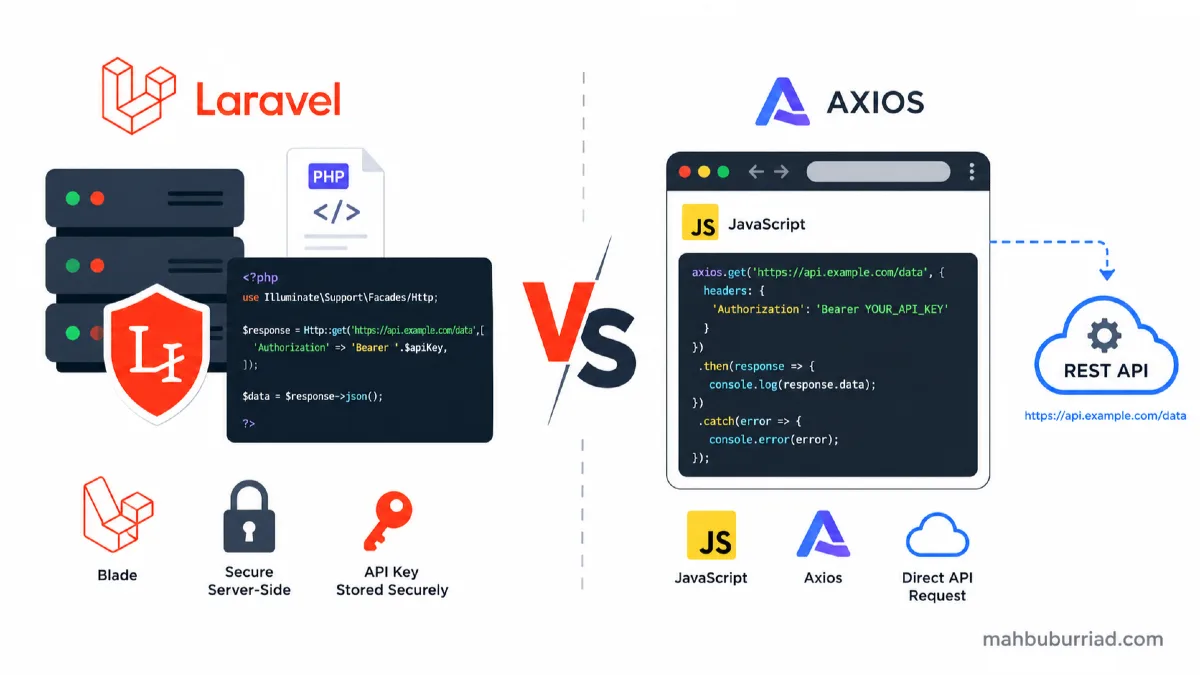
When building a Laravel application that consumes an external API, one of the first architectural decisions you'll face is deceptively simple:
Should I call the API from my Blade view using JavaScript (Axios/Fetch), or should the Laravel controller fetch the data and pass it to the view?
Both approaches work. Both have real use cases. But choosing the wrong one for your situation leads to security holes, poor performance, and unmaintainable code. This guide walks through both patterns with real examples and gives you a clear decision framework.
The Two Approaches at a Glance
┌─────────────────────────────────────────────────────────────┐
│  APPROACH A: Controller (Server-Side)                       │
│                                                             │
│  Browser → Laravel Route → Controller → Http::get(API)     │
│         ← Blade View ← $data ←────────────────────────     │
└─────────────────────────────────────────────────────────────┘

┌─────────────────────────────────────────────────────────────┐
│  APPROACH B: JavaScript (Client-Side)                       │
│                                                             │
│  Browser → Laravel Route → Blade View (HTML skeleton)      │
│  Browser → axios.get(API URL) → JSON response              │
│  Browser → Renders data into DOM                           │
└─────────────────────────────────────────────────────────────┘
The difference isn't just "where the code lives" — it fundamentally affects who knows your API key, when the user sees data, and how cacheable the response is.
Approach A: Fetching API Data via Laravel Controller (Server-Side)
The controller fetches data from the external API using Laravel's built-in Http client, then passes it to the Blade view as a variable.
Setup
// routes/web.php
Route::get('/exchange-rates', [ExchangeRateController::class, 'index']);
// app/Http/Controllers/ExchangeRateController.php
<?php

namespace App\Http\Controllers;

use Illuminate\Http\Request;
use Illuminate\Support\Facades\Http;
use Illuminate\Support\Facades\Cache;

class ExchangeRateController extends Controller
{
    public function index()
    {
        // Cache API response for 10 minutes to avoid hammering the external API
        $rates = Cache::remember('exchange_rates', 600, function () {
            $response = Http::withHeaders([
                'Authorization' => 'Bearer ' . config('services.exchange_api.key'),
            ])->get('https://api.exchangerate.host/latest', [
                'base'    => 'USD',
                'symbols' => 'BDT,EUR,GBP,INR',
            ]);

            if ($response->failed()) {
                return null;
            }

            return $response->json('rates');
        });

        return view('exchange-rates.index', compact('rates'));
    }
}
{{-- resources/views/exchange-rates/index.blade.php --}}
@if($rates)
    <table class="table">
        <thead>
            <tr>
                <th>Currency</th>
                <th>Rate (vs USD)</th>
            </tr>
        </thead>
        <tbody>
            @foreach($rates as $currency => $rate)
            <tr>
                <td>{{ $currency }}</td>
                <td>{{ number_format($rate, 4) }}</td>
            </tr>
            @endforeach
        </tbody>
    </table>
@else
    <p class="text-danger">Unable to load exchange rates. Please try again later.</p>
@endif
What you get with this approach
- ✅ API key stays on the server — never exposed to the browser
- ✅ Response is cacheable at the Laravel level
- ✅ Full data available on first page load (no flicker or skeleton screen)
- ✅ Works even if the user has JavaScript disabled
- ✅ Easier to test with
Http::fake()in feature tests - ✅ SEO-friendly — content is in the initial HTML
Approach B: Fetching API Data in Blade via JavaScript (Client-Side)
The Blade view renders an empty skeleton, and JavaScript (Axios or Fetch API) calls the external API directly from the browser after page load.
Setup
{{-- resources/views/exchange-rates/index.blade.php --}}
<div id="rates-table">
    <p>Loading rates...</p>
</div>

@push('scripts')
<script>
// ⚠️ WARNING: API key visible in browser DevTools!
const API_KEY = "your-api-key-here";

axios.get(`https://api.exchangerate.host/latest?base=USD&symbols=BDT,EUR,GBP,INR`, {
    headers: { Authorization: `Bearer ${API_KEY}` }
})
.then(response => {
    const rates = response.data.rates;
    let html = '<table class="table"><thead><tr><th>Currency</th><th>Rate</th></tr></thead><tbody>';
    for (const [currency, rate] of Object.entries(rates)) {
        html += `<tr><td>${currency}</td><td>${rate.toFixed(4)}</td></tr>`;
    }
    html += '</tbody></table>';
    document.getElementById('rates-table').innerHTML = html;
})
.catch(error => {
    document.getElementById('rates-table').innerHTML = '<p class="text-danger">Failed to load rates.</p>';
});
</script>
@endpush
What you get with this approach
- ✅ Non-blocking — page loads instantly, data fills in after
- ✅ Good for real-time or frequently refreshing data
- ✅ Works well with SPA-style interactions (Vue, Alpine.js, React)
- ❌ API key is exposed in browser DevTools / Network tab
- ❌ CORS restrictions may block the request entirely
- ❌ Data is not available on initial page load (bad for SEO)
- ❌ Cannot be cached at the Laravel layer
Security: The Most Important Consideration
This is where most developers make a costly mistake.
Never expose API keys in client-side JavaScript
When you write const API_KEY = "sk-..." in a Blade view or any .js file, that key is:
- Visible to anyone who opens Browser DevTools → Network tab
- Visible in the page source (
Ctrl+U) - Potentially scraped by bots
- A GDPR / Terms-of-Service violation for most API providers
// ❌ NEVER do this — key is exposed
axios.get('https://api.openai.com/v1/chat/completions', {
    headers: { Authorization: 'Bearer sk-abc123yourrealkey' }
});
Even if the API offers "public/anonymous" endpoints, always route through your Laravel backend to maintain control, rate-limit calls, and log usage.
The controller approach hides credentials completely
// ✅ Key lives in .env, never reaches the browser
Http::withToken(config('services.openai.key'))
    ->post('https://api.openai.com/v1/chat/completions', [...]);
Your .env key → config('services.openai.key') → only ever used in PHP land.
Performance Comparison
| Metric | Controller (Server-Side) | JavaScript (Client-Side) |
|---|---|---|
| Time to First Byte | Slightly slower (API call blocks render) | Fast (HTML shell renders immediately) |
| Time to Content | Fast (data in first response) | Slower (extra round-trip after page load) |
| Caching | Easy with Cache::remember() |
Must implement yourself (localStorage etc.) |
| SEO | ✅ Indexed by crawlers | ❌ Not indexed without SSR |
| API Rate Limits | Controlled server-side | Per-user browser requests (harder to control) |
For a content-heavy page where data needs to be indexed by Google, controller-side always wins. For a live dashboard widget that refreshes every 30 seconds, JavaScript polling or WebSockets make more sense.
When to Use Which Approach
Use the Controller (Server-Side) when:
- The API key must remain private (99% of cases)
- The data needs to be SEO-indexed
- You want to cache the response server-side
- The data is required for the initial page render
- You're building traditional server-rendered Laravel apps
- You need to transform, filter, or validate the API response before display
Use JavaScript (Client-Side) when:
- The API is truly public with no key (e.g., public open data endpoints)
- The data updates in real time (live scores, live prices)
- You're building a full SPA (Vue/React) where Laravel is just an API backend
- User interaction triggers the data load (search-as-you-type, infinite scroll)
- You want to avoid blocking the page render for non-critical content
Hybrid Pattern: Laravel as API Proxy
The best of both worlds: JavaScript calls a Laravel route (not the external API directly), and Laravel proxies the request, protecting the key.
// routes/api.php
Route::get('/exchange-rates', [ExchangeRateController::class, 'rates'])
    ->middleware('throttle:60,1'); // Rate limit: 60 req/min
// app/Http/Controllers/ExchangeRateController.php
public function rates()
{
    $rates = Cache::remember('exchange_rates', 300, function () {
        return Http::withToken(config('services.exchange_api.key'))
            ->get('https://api.exchangerate.host/latest', ['base' => 'USD'])
            ->json('rates');
    });

    return response()->json($rates);
}
// In your Blade/Vue component — calls YOUR Laravel API, not external
axios.get('/api/exchange-rates')
    .then(response => {
        this.rates = response.data;
    });
This pattern is ideal for:
- Livewire + Alpine.js apps that load data dynamically
- Vue/React components embedded in a Laravel Blade layout
- Any scenario needing both real-time updates AND API key security
Real-World Example: Currency Exchange Rate Widget
Let's build a complete example combining the proxy pattern, caching, and a clean Blade + Alpine.js widget.
Controller
<?php

namespace App\Http\Controllers\Api;

use App\Http\Controllers\Controller;
use Illuminate\Support\Facades\Cache;
use Illuminate\Support\Facades\Http;

class CurrencyController extends Controller
{
    public function rates()
    {
        $rates = Cache::remember('currency:usd_rates', 300, function () {
            $response = Http::timeout(10)
                ->withToken(config('services.fixer.key'))
                ->get('https://data.fixer.io/api/latest', [
                    'base'    => 'USD',
                    'symbols' => 'BDT,EUR,GBP,INR,AED,SAR',
                ]);

            abort_if($response->failed(), 503, 'Exchange rate service unavailable');

            return $response->json('rates');
        });

        return response()->json([
            'rates'      => $rates,
            'cached_at'  => now()->toIso8601String(),
            'expires_in' => 300,
        ]);
    }
}
Blade + Alpine.js Widget
<div
    x-data="currencyWidget()"
    x-init="fetchRates()"
    class="bg-white rounded-xl shadow p-6"
>
    <h2 class="text-lg font-bold mb-4">Live Exchange Rates</h2>

    <template x-if="loading">
        <div class="animate-pulse space-y-2">
            <div class="h-4 bg-gray-200 rounded w-3/4"></div>
            <div class="h-4 bg-gray-200 rounded w-1/2"></div>
        </div>
    </template>

    <template x-if="!loading && rates">
        <table class="w-full text-sm">
            <thead>
                <tr class="text-left text-gray-500">
                    <th>Currency</th>
                    <th>Rate vs USD</th>
                </tr>
            </thead>
            <tbody>
                <template x-for="[currency, rate] in Object.entries(rates)" :key="currency">
                    <tr class="border-t">
                        <td x-text="currency" class="py-2 font-medium"></td>
                        <td x-text="parseFloat(rate).toFixed(4)" class="py-2 text-blue-600"></td>
                    </tr>
                </template>
            </tbody>
        </table>
        <p class="text-xs text-gray-400 mt-3">
            Updated: <span x-text="cachedAt"></span>
        </p>
    </template>

    <template x-if="error">
        <p class="text-red-500 text-sm" x-text="error"></p>
    </template>
</div>

@push('scripts')
<script>
function currencyWidget() {
    return {
        rates: null,
        cachedAt: null,
        loading: true,
        error: null,

        fetchRates() {
            // Calls our Laravel proxy — API key is NEVER exposed
            axios.get('/api/currency/rates')
                .then(res => {
                    this.rates    = res.data.rates;
                    this.cachedAt = new Date(res.data.cached_at).toLocaleTimeString();
                })
                .catch(() => {
                    this.error = 'Unable to load exchange rates.';
                })
                .finally(() => {
                    this.loading = false;
                });
        }
    };
}
</script>
@endpush
Summary Table
| Scenario | Recommended Approach |
|---|---|
| API key must stay secret | ✅ Controller (server-side) |
| SEO-indexed content | ✅ Controller (server-side) |
| Initial page load data | ✅ Controller (server-side) |
| Data cacheable for minutes | ✅ Controller + Cache::remember() |
| Real-time updates (live refresh) | ✅ JS → Laravel proxy route |
| User-triggered fetch (search, filter) | ✅ JS → Laravel proxy route |
| Full SPA (Vue/React) | ✅ JS → Laravel API routes |
| Public API with no key | ✅ Either (JS is fine here) |
| Sensitive 3rd-party key in JS | ❌ Never |
Conclusion
The short answer: default to the controller approach, use JavaScript only for dynamic interactions, and always proxy external APIs through Laravel when a key is involved.
Here's your decision tree:
Does the API require a secret key?
├── YES → Always use Controller / Laravel proxy
│         (never expose keys to the browser)
└── NO  → Is the data needed for SEO or initial render?
          ├── YES → Use Controller
          └── NO  → JavaScript client-side is fine
Laravel's Http client is expressive, supports retries, timeouts, and fakes for testing — there's rarely a good reason to bypass it. Combine it with Cache::remember() and a clean service class, and you have a robust, secure, and performant API integration layer.
Found this useful? Share it or leave a comment. More Laravel architecture deep-dives at mahbuburriad.com.